 Zed Browser
A scam website detector that warns you while you browse
Zed checks the pages you open for signs of scams and phishing, such as fake bank logins and fake shops, and warns you as the page loads, before you sign in or pay. It's a free browser for Android with the scam detector built in. Only want to check one link? See below.
5 free scans a day · From Google Play · Phones, tablets and Chromebooks
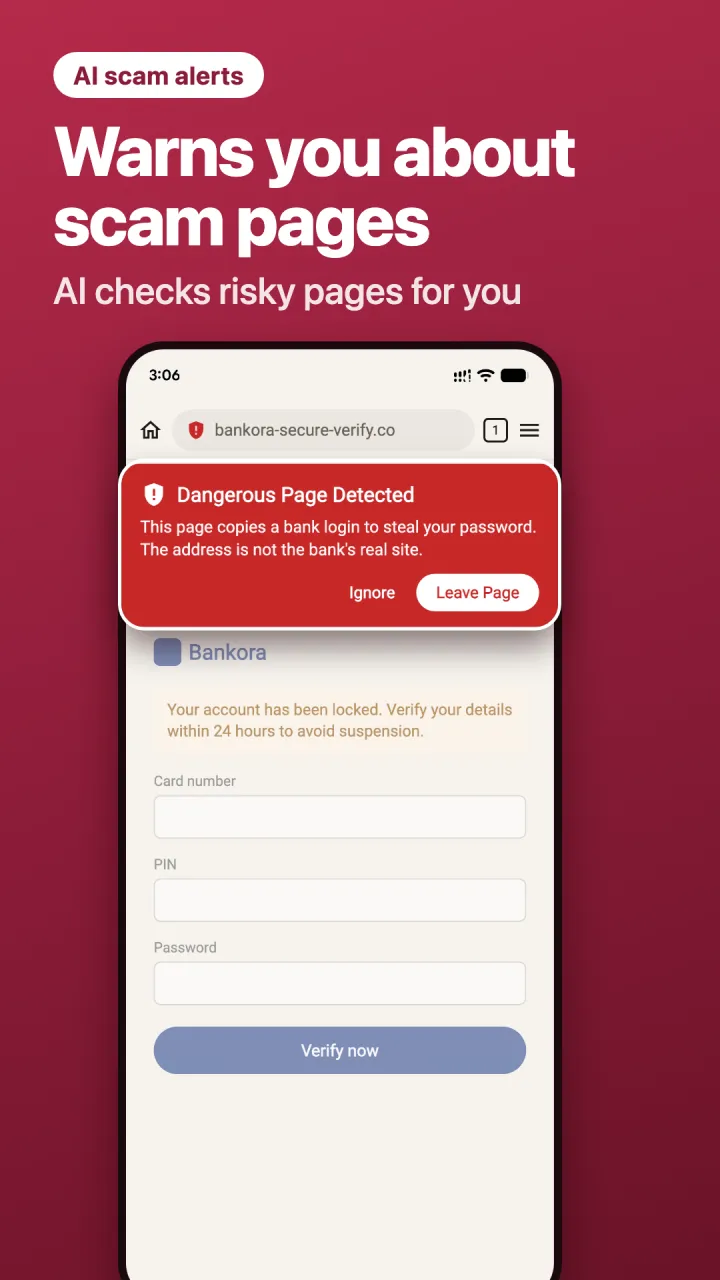
How Zed spots a scam website
- It checks the address first. Pages from well-known, trusted sites need no scan. A site Zed has already found dangerous is flagged again instantly, without a new scan.
- It looks at risky pages more closely. For unknown sites, Zed checks the address, the forms on the page (for example a password or card field) and its scripts, then uses AI to judge whether the page is trying to trick you.
- It tells you clearly. The shield in the address bar shows whether a page looks safe, suspicious or dangerous. A dangerous page shows a warning with a Leave page button.
Zed also warns you about insecure connections and certificate problems, which fake sites often have. It blocks ads and pop-ups too, which is where many scams start: see Zed's ad blocker.
The AI check includes 5 free scans a day. Zed Premium checks every unknown page.
How to tell if a website is a scam
A scam detector helps, but these checks catch most fake websites on their own:
- Read the address carefully. Scam sites use names close to the real one, like extra words, swapped letters or an unusual ending.
- Be wary of prices that are too good. Big brands at 70–90% off are a classic sign of a fake shop.
- Check how you're asked to pay. Bank transfer, gift cards or crypto only, with no card or buyer protection, is a warning sign.
- Watch for pressure. Countdown timers, "your account will be closed" or "you've won" messages push you to act before you think.
- Look for real contact details. No address, no phone number, or only a form is a bad sign.
- Never log in from a link in a message. Open the app or type the address yourself instead.
Check a link without installing anything
To check one address, paste it into Google's free Safe Browsing site status page. It tells you whether Google has flagged the site as dangerous. New scam sites appear every day, so a clean result isn't a guarantee; that's why Zed also looks at the page itself.
Questions
What is a phishing link?
A link to a fake page made to look like a real one, such as your bank or a delivery company, so you type your password or card details into it.
Does Zed check links in other apps?
No. Zed checks the pages you open in Zed. If you tap a link in a message, open it in Zed to have it checked.
Does the scam detector see my passwords?
No. To check a risky page, Zed sends the AI its address and the layout of its login form, never what you type.
Is the scam detector free?
Yes, with 5 free scans a day. Zed Premium checks every unknown page.
Browse with a scam detector on your Android phone
Free on Google Play. No sign-up.