 Zed Browser
Free ad blocker for Android, built into the browser
Zed is a free ad blocker for Android built into the browser: it blocks ads, pop-ups and trackers on every site you open, with nothing to set up. Turn it off for any one site with a single tap.
Free · No add-ons · Phones, tablets and Chromebooks
What Zed blocks: ads, pop-ups, trackers
- Ads: banners, boxes and video ads that sites load from ad networks.
- Pop-ups: new tabs and windows that open on their own when you tap a page.
- Trackers: hidden scripts that follow you from site to site to build a profile of you.
- Cookie banners: the "accept cookies" boxes that cover the page.
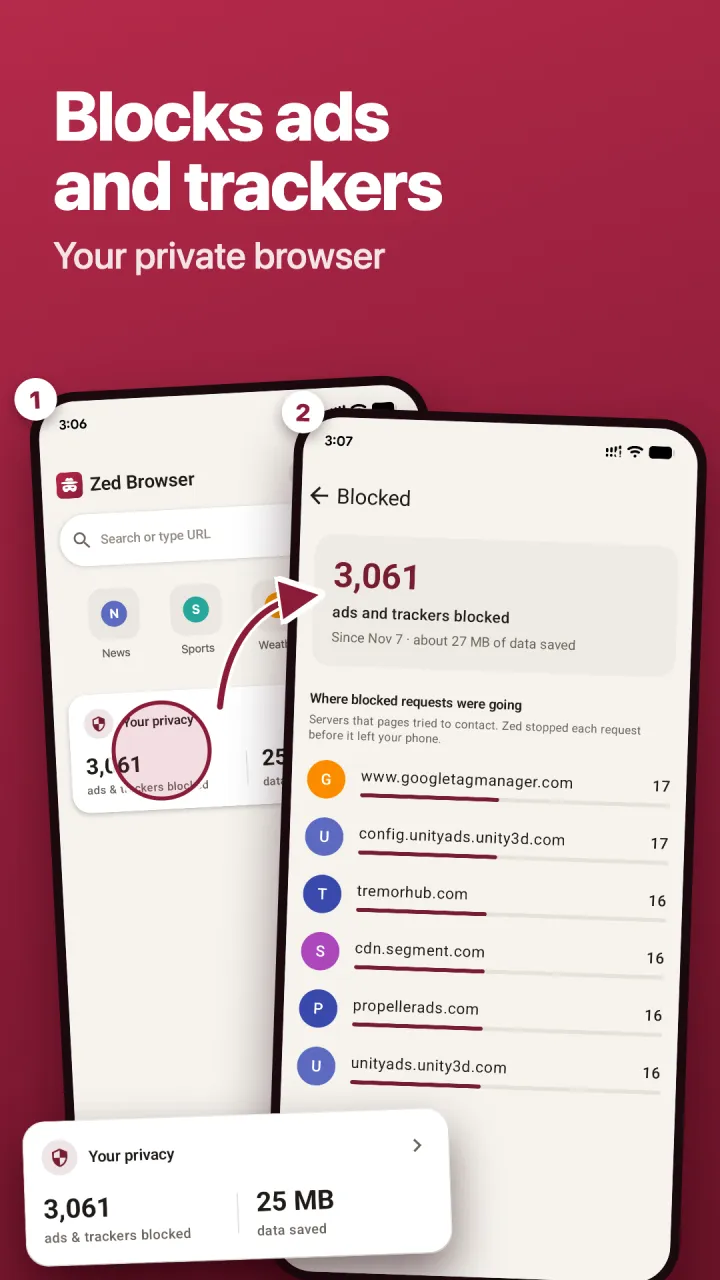
Blocked requests never leave your phone, so pages load less and use less mobile data. The Blocked screen shows how many ads and trackers Zed stopped, where they were going and roughly how much data you saved.
How the ad blocker works
When a page loads, it asks dozens of other servers for ads and tracking scripts. Zed checks each request against public filter lists, the same kind that popular desktop blockers use, and stops the ones that belong to ad and tracking networks. It then hides the empty spaces the ads leave behind, so pages look clean rather than broken.
If a site doesn't work properly with blocking on, you can turn protection off for that one site with a single tap. Every other site stays protected.
Browser ad blocker or ad blocker app?
There are two ways to block ads on Android, and the best ad blocker for you depends on where you see ads.
- A browser with adblock built in, like Zed, blocks ads on websites. It needs no special permissions and doesn't touch your other apps.
- A system-wide ad blocker app tries to block ads in every app. To do that it usually routes all your phone's traffic through a local VPN, and some of them are only offered as APKs outside Google Play.
Chrome on Android doesn't support ad-blocking add-ons, and Samsung Internet needs one installed first. A browser with the blocker built in works straight away.
Is Zed's ad blocker free?
Yes. Ad and tracker blocking is free, with no limit and no sign-up. Zed Premium only adds unlimited AI features.
Questions
Can Zed block ads in other apps and games?
No. Zed blocks ads on the websites you open in Zed. Ads inside other apps and games come from those apps, and a browser can't reach them.
Why does a site still show an ad?
Some sites serve ads from their own servers, mixed in with the page itself. Those can't always be told apart from real content, so a few may get through. Filter lists are updated regularly to catch new ones.
Can I block ads on Samsung phones and in Samsung Internet?
Samsung Internet blocks ads only after you add a separate ad-blocker add-on (Samsung's guide). Zed has blocking built in and works on any Samsung phone or tablet, and on Chromebooks that run Android apps.
Will blocking ads break sites?
Rarely. If a page looks wrong, turn protection off for that site with one tap.
Pop-ups that appear outside your browser come from an app: read how to stop pop-up ads on Android.
Using Chrome? See how to block ads in Chrome on Android.
Block ads on your Android phone
Free on Google Play. Works from the first page you open.